
On October 7, 2026, Anthropic began including a monthly Claude API credit with its Max and Team subscriptions. Apps like SteerClaw can spend that credit through an API key. Link the credit, create a key, paste it into SteerClaw, and your phone runs the agent on Claude at no extra cost until the monthly allowance is used.
| Plan | Monthly API credit |
|---|---|
| Claude Max 5x | $100 |
| Claude Max 20x | $200 |
| Claude Team, Standard seat | $20 per seat, pooled |
| Claude Team, Premium seat | $100 per seat, pooled |
| Claude Team pool cap | $500 per month |
| Claude Free, Pro and Enterprise | Not included |
Source: Anthropic’s documentation page on API credits for subscribers, read on October 14, 2026. The figures may change; the page is the authority.
Before you start
You will use two Anthropic websites:
- claude.ai is where you chat with Claude and manage your plan.
- The Claude Console, at platform.claude.com, is Anthropic’s website for using Claude in other apps such as SteerClaw. That is where the credit goes and where you create the key. In the Console your account lives in an organization, which is simply the name for your account space there. If you have never used the Console, you will create one in Part 1.
There are three parts: link your plan to a Console organization, create a key there, and paste the key into SteerClaw.
Who can claim it
- Your Max or Team plan must be active and in good standing. New subscribers can claim after seven days on an eligible plan.
- Plans bought through the iPhone or Android Claude app are eligible, but you must claim on claude.ai in a browser.
- Annual plans receive the credit monthly.
- Each plan links to exactly one Console organization, and Anthropic says you cannot change the link yourself afterwards. If you are unsure which to use, create a new organization just for this.
Part 1: Link your plan to a Console organization
- Open billing on claude.ai. For Max, go to Settings, then Billing. For Team, the Primary Owner or an Owner goes to Organization settings, then Billing.
- In the API credits section, choose or create a Console organization. If you have never used the Console, create a new one and name it after yourself. You need the Owner, Admin or Billing role in it, which you have in an organization you create.
- Accept the program terms and confirm. The terms link to Anthropic's Supplemental Credit Terms. Anthropic says you do not need to add a payment method to the Console for the included credit.
- Check the balance. Open platform.claude.com/settings/billing. The credit appears under Promotional credits with its amount and expiry date.
Part 2: Create an API key
- Open the API keys page. Go to platform.claude.com/settings/keys, inside the organization you just linked.
- Choose Create key. Name it something like "SteerClaw phone". You can set an expiry date. If your organization has more than one workspace, limit the key to one of them.
- Copy the key. It starts with
sk-ant-and is shown once. Keep it private: anyone who has it can spend your credit.
Doing this on your phone? Copy the key in the browser and paste it into SteerClaw in Part 3. On a computer, open steerclaw.ai/qr, paste the key there, and scan the code from the key field in SteerClaw instead of typing it. The page generates the QR code in your browser and never sends the key anywhere.
Part 3: Add Anthropic in SteerClaw
You can add Anthropic while you set up the app, or at any time afterwards. The key screen is the same either way.
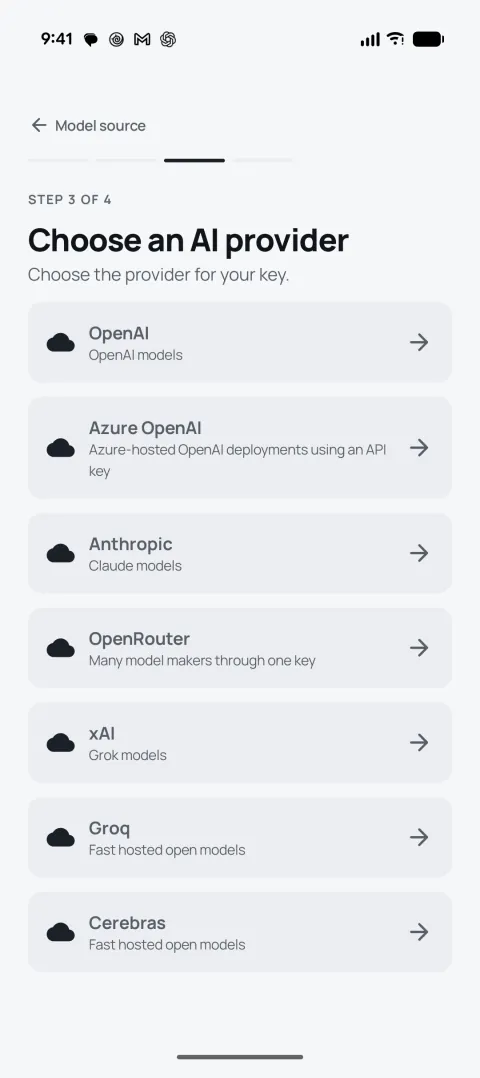
During setup. On step 2, “Add your first model”, choose API keys. On the next screen, “Choose an AI provider”, choose Anthropic.
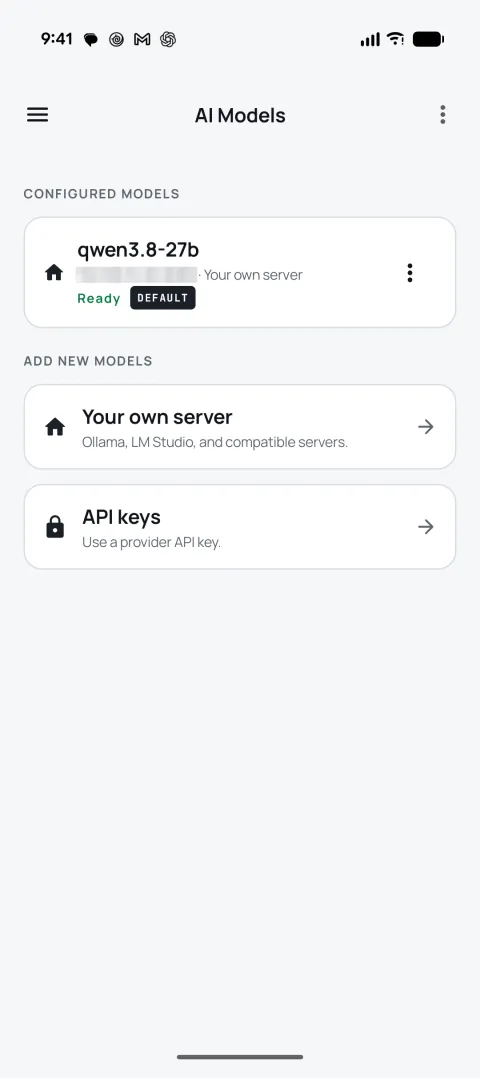
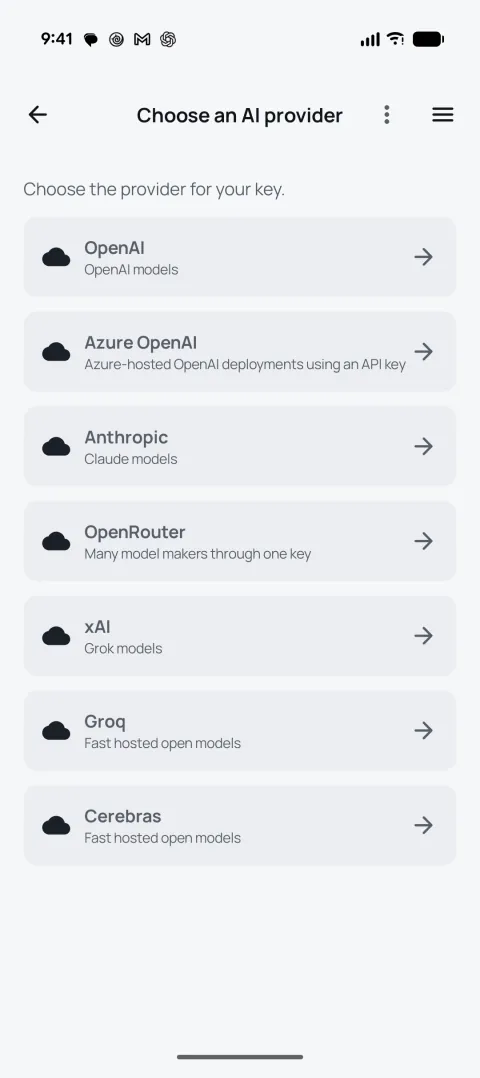
After setup. Open the menu (☰), choose AI Models, then under Add new models choose API keys, then Anthropic.
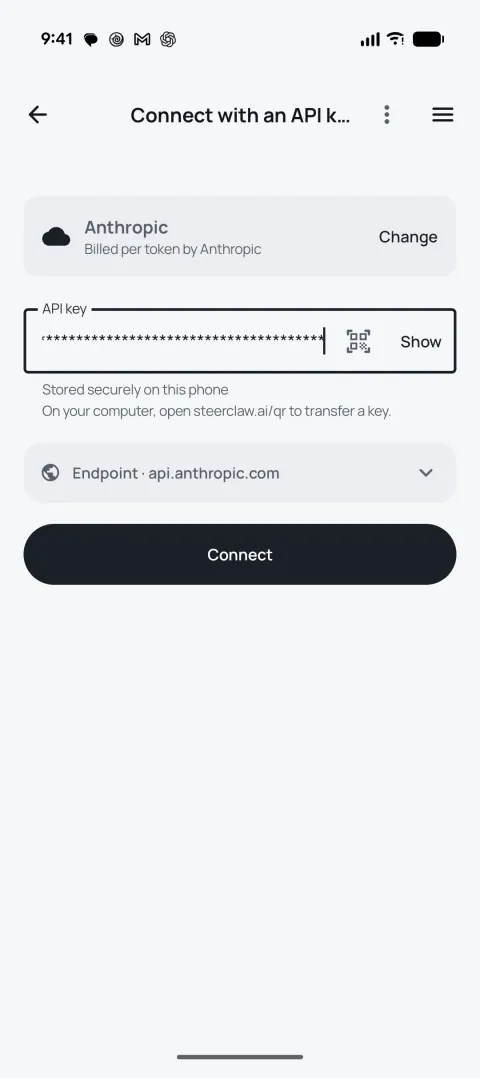
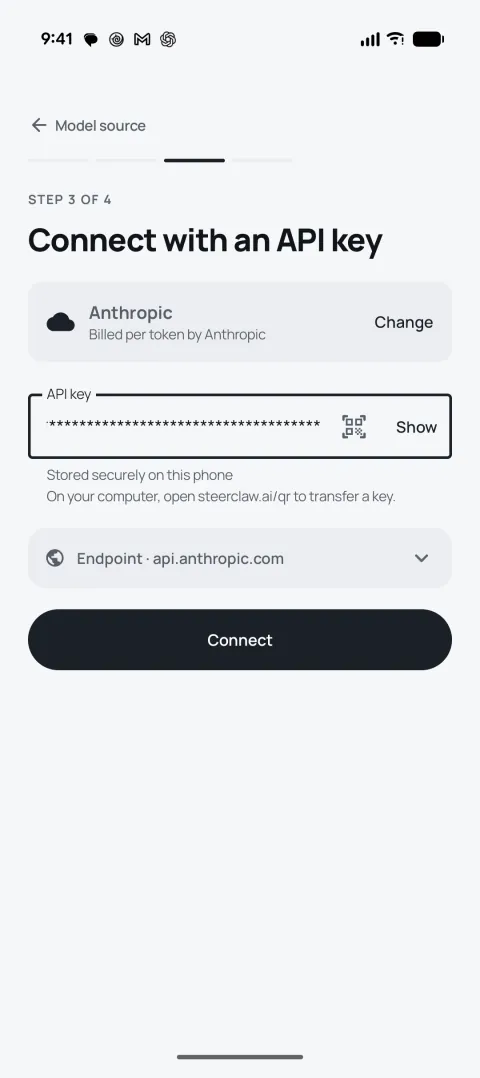
Then, on the key screen:
- Paste or scan the key. Paste it into the API key field, or tap the QR icon in the field and scan the code from steerclaw.ai/qr. The endpoint is already set to
api.anthropic.com; leave it. - Tap Connect. SteerClaw checks the key and asks Anthropic which models it can use.
- Choose a model. Claude Sonnet 5.5 is a strong default for agent work. Haiku 5.5 is the cheapest and fast enough for most everyday tasks. Opus 5.5 is for the hardest jobs. All current Claude models can read images and use SteerClaw's tools, so every feature works.
If Connect fails, check that you copied the whole key.
If your first message fails with a “credit balance is too low” error, check that the key came from the organization you linked and that Part 1 is complete. New subscribers can claim the credit only after seven days on an eligible plan.
Every request now goes from your phone directly to Anthropic with your key. Steer Corp does not see the request or the key.
Keeping an eye on spend
- The Console’s Cost page shows what you have spent, and the Usage page shows how much text went in and out. Included credit is spent before any purchased credit.
- If you also buy credit, set a spend limit on the billing page so a runaway task cannot go past what you intend.
- Unused included credit expires at the end of each billing cycle. There is no reason to save it.
What the credit does and does not cover
The credit pays for the Claude API, which is what SteerClaw uses. Anthropic also lists Claude Managed Agents, the Claude Agent SDK and the Console playground. It does not pay for interactive Claude Code in the terminal, an IDE, desktop or web, for extra usage inside the Claude apps, or for Claude through Claude Platform on AWS, Amazon Bedrock, Google Cloud or Microsoft Foundry.
Next: your first task
Your phone now runs SteerClaw on Claude. Try your first task to see what it can do.
Frequently asked questions
Can I sign in to SteerClaw with my Claude Pro or Max account instead of a key?
No. Anthropic's terms do not allow third-party apps to use claude.ai logins or Pro and Max subscription credentials. SteerClaw follows that policy and only accepts API keys. The monthly credits let Max and Team subscribers use the API, and so any key-based app, without separate payment.
Does a Claude Pro plan get API credits?
Not as of October 2026. Anthropic's documentation lists Max 5x, Max 20x and Team as eligible, and says Free, Pro and Enterprise plans are not. If you are on Pro, you can still use Claude in SteerClaw by adding a payment method or prepaid credit in the Claude Console.
How much SteerClaw use does $100 cover?
For most people, a lot. On Claude Sonnet 5.5, a day of heavy document and research tasks usually costs a few dollars, more for long tasks, and Haiku 5.5 costs far less. Anthropic charges by the amount of text in and out, measured in tokens: per million tokens, Haiku 5.5 is $0.10 in and $0.50 out for prompts up to 100,000 tokens, Sonnet 5.5 is $2 and $10, and Opus 5.5 is $4 and $20. The Console's Cost page shows spend as you go.
What happens when the credit runs out?
Requests fail with a message that the credit balance is too low. SteerClaw shows the provider's error. You can add purchased credit in the Console to keep going, or switch SteerClaw to another model until the next billing cycle. Unused included credit does not roll over.
Can I use the credits with the key on more than one phone?
Yes. Every key in the linked Console organization draws from the same balance, so the same key, or separate keys from that organization, can be used on an Android phone and an iPhone. Anthropic's credit terms say the credit is for the account holder's own use and cannot be transferred or sold.